Computing Systems Frequently Asked Questions
Computing Systems Frequently Asked Questions
For general support information on the Martinos Center computing systems, please see our Computer Accounts and Resources page.
General
Accounts and Passwords
- How do I get a Martinos Center login account?
- How do I get an MRI/MEG scanner account?
- How do I get an email account?
- How do I change or reset my NMR password?
- I'm leaving the Martinos Center, will my account be closed?
- What about my Partners username and password?
- How do I read my email?
- Why should I use IMAP instead of POP?
- How do I get a full backup of all my email?
- How do I forward my email to another account?
- How do I access my Partners email account?
- How do I get my Partners email forwarded to my NMR account?
- How do I change how the Partners E-mail Gateway filters my email?
- How do I setup an Out of Office / On Vacation message?
- How do I access email from offsite?
- Why are attachments over 50MB rejected and what do I do instead?
- How do I subscribe/unsubscribe from mailing lists?
- Can my lab have a shared email account for recruiting purposes?
- Why are my posts to Martinos Center mailing lists failing?
- I received a strange E-mail message about my NMR account. Is it real?
- What should I do when I receive spam or phishing e-mail. Is there anything I can do about it?
- OS X Mail says a certificate could not be verified. Can I fix this?
- Outlook Mail says a certificate could not be verified. Can I fix this?
- How do I delete emails in Squirrelmail once I'm over quota?
- Thunderbird keeps crashing. What can I do about it?
Computing Facilities
- What computers can I use interactively?
- How do I use the non-interactive batch cluster "launchpad?"
- What computers should I buy for use at the Center?
- I bought my computer. What do I do to get it on the NMR network?
- How do I enroll my new Mac device in PEAS?
- How do I encrypt my laptop?
- Do I need to do anything if I move a computer/laptop?
- How should I dispose of old computer equipment?
- How do I get on the network using wireless?
- Is there a flatbed scanner I can use to scan my photos/documents?
- My computer won't turn on, what should I do?
Applications
- I need program X installed on my workstation?
- What programs do we have a site license for?
- Which anti-virus software should I install on my computer?
- How do I run Matlab on my NMR linux computer?
- How do I run Matlab on my own Windows or Mac computer?
- How can I install Microsoft Office?
- How do I buy SPSS or SAS or S-PLUS?
- How do I buy Adobe Products?
- How do I buy Endnote?
- How do I buy other software?
- How do I run Freesurfer or other analysis programs?
- What program do I use to view/edit images? To screen capture? I cannot find the xv program?
- How do I get my Linux box to show Chinese/Japanese/Russian/Greek/etc.
- My GNOME Desktop is acting strangely. How do I reset it?
- How can I change my default login from Gnome to KDE?
- Firefox keeps complaining it is already running. Should I create a new profile?
- Firefox is acting abnormal and not displaying correctly?
- Someone in my lab has locked the screen on their linux desktop. Can I unlock it?
- How do I build/run Docker containers on my linux desktop?
Files and Disk Space
- Why is my login to CentOS hanging? How can I reset my .cshrc?
- How do I use the graphical file browser in Linux to view my partitions in /space ?
- Why does my home directory have such a small quota?
- I am over quota. How do I fix it?
- Where can I store my data?
- Is there any large temporary space I can use?
- Is my data backed up?
- Is my home directory backed up?
- How do I get files restored from a volume that is backed up?
- Who can read, write, delete my files?
- How do I setup permissions so a group of users have write access?
- How do I find out what permission groups I am in?
- How secure is my data?
- How do I mount a USB drive on my computer?
- How do I best copy/move large amounts of data?
Remote Access
- How do I get a text login to the Linux systems from outside MGH?
- How do I get a GUI login to Linux/Windows/Mac systems from outside MGH?
- How do I use NoMachine to connect to my linux computer?
- How do I transfer my data to/from outside MGH?
- How do I make data available to outside users?
- How can outside users send me data files?
- How do I access internal MGH web sites from outside MGH?
Printing
- How do I print to printer X at the center?
- Who do I contact if the printer needs paper?
- Who do I contact if the printer needs toner?
- Who do I contact if the printer looks fine but jobs don't print?
- Who do I contact if the printer is just plain broken physically?
- How do I get a conference poster printed?
- How do I get something printed on both sides of the page (duplex printing)?
- I keep getting errors trying to print in MATLAB
Web and Other Services
- How do I get a website for my research group?
- How do I get a website just for my personal stuff?
- How do I create, change or hide my people page data on the main website?
- How do I add a photo to my people page data on the main website?
- Can you setup a Wiki for my group?
- Can you setup a content portal like Plone for my group?
- How can I access journal article PDFs?
- The Partners web content filter is blocking access to a site I need to use, what should I do?
- Can I recruit study subjects on any NMR mailing lists?
- Is there a GitLab or GitHub available to the center?
- Privacy Policy
General
How do I get help from the IT Support Group?
Email us at help@nmr.mgh.harvard.edu
Accounts and Passwords
How do I get a Martinos Center login account? MRI/MEG scanner account? email?
To get a new account, have your supervising PI (or sponsoring faculty member) fill out the Account Request Form. You must already have a Partners login account. Your email is via your Partners login account.
How do I change or reset my NMR password?
If you remember your old password and just want to change it, you can use the Change Password Form.
If you don't remember your old password, you have several options:
(1) You can use the following page to reset your Martinos account password using your Partners account credentials:
https://www.nmr.mgh.harvard.edu/facility/pwchange_partners
See the next FAQ answer below on how to reset your Partners password if you have forgotten it.
(2) We can set your password to be the same as someone else with an account at the center. It must be someone that knows you well enough to be sure it is you when they talk to you on the phone or see you in person. Then they can set a temporary password for you on the form above and then tell you on the phone so you can go set your own private one at the same form.
(3) You can come to our office at CNY149 1109 with a picture ID and we will change your password for you.
It is very important to keep your password secure and therefore passwords should never be sent by email or exposed in plain text on web pages. You should also never share your password with anyone else. Each member of your group should get their own account.
I am leaving the Martinos Center, will me account be closed?
Your account will be closed at the request of your PI or if we are notified of your Partners account being closed. Since your account login is tied to your Partners account when it is closed, your Martinos account is inaccessible by password login. You should read this page for information about your Partners email when the account is closed.
What about my Partners username and password?
If you know your Partners User name but have forgotten your password, visit https://myprofile.partners.org/. If you don't remember your User name you must contact the Partners Help Desk at 617-726-5085. If you don't have a Partners account but need one, you need to request a non-employee ID from Dee Dee Correia at the Martinos Center administrative office in CNY149 2301.
How do I access my Partners email account?
Partners has a webmail client for email at https://www.partners.org/email.
How do I read my Martinos email?
For the vast majority of users, your Martinos email should be forwarding to your Partners email address or other approved instituation address. The rest of the questions in the Email section should not apply to your and if you have problems with your Partners email you need to contact the Partners helpdesk.
If you are one of the few legacy users without forwarding, email sent to your Martinos account will reside on our central email server named mail.nmr.mgh.harvard.edu. Details on how to setup your IMAP or POP capable email client (e.g. Outlook, Entourage, Thunderbird, OSX Mail utility, etc.) to read and send email using our server is detailed on our Email page. You can also read your email through the web interface at the Martinos Center Email Server website.
Why should I use IMAP instead of POP?
The POP mail protocol downloads your messages from the mail server and usually removes them from the server at the same time. Most email clients can be configure to delete messages on the server after a set delay or even not at all. The problem with the later is your email will build up till you go over quota and then you will stop getting new email. Your huge INBOX on the server will also add to the server load. Deleting a message in your POP client email reader does not delete that same message on the server if you left it there.
Also, if you want to read your email from a second location (like the web interface when you are on vacation) you will be in one of two bad situations. If your normal email reader using POP deletes the messages from the server when it downloads them, you will see none of your old emails through the second reader. If your normal email reader using POP leaves messages on the server, you will have to sift through every email you ever got with the second reader.
Another issue with POP is if you do use two different POP email readers from different locations and are leaving email on the server, they often will interfere with each other in such a way that you will end up downloading the same messages twice or more on the same email reader. There is also a security issue with POP if you use it to access email on a machine you do not own since your email will stay on that computer if you don't delete it (and even then there are ways to recover deleted files on computers).
The better mail protocol to use if you are using desktop that is always on the network is IMAP. With IMAP, you don't download your email messages to the local machine. They all stay on the server and your email reader works like a web browser with your messages being the web pages on the remote server. When you delete a message it is deleting it on the server. Your messages are not in multiple locations so there is no confusion. You can also make subfolders through IMAP that stay on the server.
Having a second, third or more email readers running at different locations (such as at home or on your laptop or through the web interface) is not a problem. All are view the same email on the same server which through the IMAP protocol keeps everyone in sync.
The main disadvantage to using IMAP is when you want to read email on portable devices like laptops and PDAs since you cannot in general read email while disconnected from the network. Many email readers though will cache email you have read such that this is possible to some extent. They also have read-ahead settings to cache all email you get. Alternatively, it is often possible to use POP with your email readers on portable devices and still use IMAP for your main desktop email reader. Just make sure in this case you set your POP settings to NOT delete email off the server.
How do I get a full backup of all my email?
The current email server stores messages in a database system that is not directly user accessible. Several long time UNIX users where used to the old server where one could access their email messages on the server through normal flat files in the file system. They took advantage of this fact to do periodic backups of their email. The email database does have a weekly backup in the central systems, but some users still want to make their own. To do this, create a new directory on a volume with enough space to hold all your email and change into it. Then run:
mailutil transfer '{mail:143/notls}' $PWD/
It is important that last argument be a absolute path ending in the '/' character. You may get several lines saying 'Permission Denied' which you can ignore. Just check your files after it is done to see that all your email Folders are there and not empty. The whole process could take a long time if your mail store is large.
Once you have all your email in flat files in the destination directory you designated, you can use standard backup programs such as tar to tape or making a CD. Or the destination directory you give to the mailutil command could be one on an attached USB drive you use for backups.
How do I forward my email to another account?
Go to the Martinos Center Email Server website and select the "Forward your Email" link.
Note: It is possible to foward to multiple accounts, including your own NMR account, by putting multiple addresses on the line separated by commas. A back-slash (\) must be put immediately before your own local address if you want the mail to go to your local NMR Center account, i.e. \user, not simply user. Forwarding is only allowed to your Partners address and a handful of other approved institutioin domains.
How do I get my Partners email forwarded to my NMR account?
Partners does not allow email forwarding.
How do I change how the Partners E-mail Gateway filters my email?
NOTICE -- as of 8/2007, Partners new gateway filters are not user controllable and the below info is invalid. We are still waiting for them to give us more info on this.
You can modify how Parters E-mail Gateway filters your email by going to its website (INTERNAL ONLY) at https://phsmgui.partners.org. Go to the bottom of the page you see and click on the bottom "here" link. You will be emailed a session key in the form of a URL. Go to the URL (it can be quite long) and there you can change your filter settings. You can set email addresses that should always be let through using the "Approved Senders" menu choice on the upper left of the page. The above link may also be reached from the Martinos Center Email Server website which will be easier to remember for all your Martinos Center E-mail needs.
NOTE: By letting messages through the filter in this manner you increase the risk of letting a message with a virus or trojan get into your mailbox and infect your computer and possibly other computers as well.
How do I setup an Out of Office / On Vacation message?
Go to the Martinos Center Email Server website and select the "Out-of-Office Reply" link.
How do I access email from offsite?
Go to the Martinos Center Email Server website and select the "Read Email" link. If you want to use a remote IMAP email reader client, read the settings instructions you will find on our Email page.
Why are attachments over 50MB rejected and what do I do instead?
When an email with a 50MB attachments ends up going to our all hands mailing list, it will end up in over 600 inboxes taking up over 20GB of space on the mail server. We actually limit attachments to just 40K on our all hands lists for this reason, but for other lists you can see how such things can quickly fill up our server. So for general email we feel that 50MB is a good cut-off. Many other sites you might try to send to might have even smaller limits. A 10MB attachment limit is common.
When you need to exchange a file larger than 10MB with another email user (or group of users) onsite or offsite, the solution is to use the FileDrop application. This application lets you upload the attachments to a secure website and it will send an email to all email addresses of your choice telling them how to access them. Go to the Martinos Center Email Server website and select the "FileDrop" link.
The same situation applies to remote users trying to send you large attachments. Direct them to the same site above.
FileDrop is still limited to a few 100MBs. If you have larger files, you will need to use the Partners Research Computing Secure File Transfer & Collaboration Site. The tools there handle amounts up to 100GB. If you need to transfer more than that, contact help@nmr.mgh.harvard.edu
How do I subscribe/unsubscribe from mailing lists?
To sign up for a mailing list or get a list of existing lists, see this page.
Note that subscription to the all-accounts and all-hands mailing lists is required of all Martinos Center account holders. Subscription to other lists may be compulsory depending on what you do at the center (such as mri-scan if you use the MRI scanners).
Can my lab have a shared email account for recruiting purposes?
Call the Partners Help Desk at 617-726-5085 to request a shared email account. The address will be "nameyouchoose"@partners.org or @mgh.harvard.edu. The Martinos Center does not support shared @nmr.mgh.harvard.edu or @martinos.org accounts.
Why are my posts to Martinos Center mailing lists failing?
There are two common reasons.
Many lists are closed and you need to be a member by registering your e-mail address. To join start at this page.
The second reason has to do with the From: field your mail software is sending. Closed lists compare the From: field with the registered address you gave when you joined to determine if your post should be accepted. These addresses need to be exactly identical for the post to be accepted. If they are not identical, character for character, the post will be rejected. Your choices here are 1) to change the registered address to be the same as what your mail software is sending or 2) change what your mail software sends as the From: field to be the same as that address which you registered. The first choice requires you to unsubscribe the current address and resubscribe with the same address as in your From: field. The second choice requires you to reconfigure your mail software to send the same From: address as that which you registered with the list.
I received a strange E-mail message about my NMR account. Is it real?
NMR staff will never send you an e-mail asking you to send your password via e-mail. We do send out periodic emails asking you to change your password according to the password change policy schedule. It is imperative you always carefully check the website addresses of any site such emails send you to. Feel free to e-mail help@nmr.mgh.harvard.edu to verify if you have doubts. All email asking you for any personal information must be considered suspect at a minimum and possibly a phishing scam of some sort. Educate> yourself on spotting Phish.
What should I do when I receive spam or phishing e-mail. Is there anything I can do about it?
If you receive any suspicious spam, especially phishing emails that attempt to harvest your password or trick you into opening a nefarious URL, please forward the email as an attachment to nospam@partners.org.
Here are instructions on how to forward an email as an attachment.
You can report spam to the Federal Trade Commission by forwarding it to spam@uce.gov as outlined here: http://onguardonline.gov/articles/0038-spam
You can also add email addresses to your blocked senders list by modifying your Partner E-mail Gateway filters as detailed here.
Here is a guide to detecting phishing attacks.
OS X Mail says a certificate could not be verified. Can I fix this?
You run the OS X Mail utility to read your NMR e-mail (You have already properly configured it, yes?) and it says Unable to Connect and goes on about "Mail was unable to verify the identity of this server" and adds "The root certificate for this server could not be verified" then asks if you want to continue. It does this every time you run Mail and it's annoying. This can be remedied. You need the NMR Certificate downloaded to your computer and stored on your keychain. The following procedure accomplishes this.
Download the certificate by clicking the following URL in the Safari Web browser.
http://www.nmr.mgh.harvard.edu/nmrca.crt
Nothing much will happen on the browser screen but the certificate should get downloaded to your download area, often your home directory, your Documents directory or your Desktop. Double click on the nmrca.crt icon and the Keychain utility should fire up. It will ask if you want to add the certificate. In the Keychain pull down list select X509Anchors, that's the trusted server list. Click OK and you should be asked for your password, enter it and click OK. It should add the certificate to your keychain at that point. Then you can quit the Keychain utility. That should do it. When you run Mail next, it should no longer gripe about the certificate being unverifiable.
Outlook Mail says a certificate could not be verified. Can I fix this?
You run Outlook to read your NMR e-mail over SSL (You have already properly configured it, yes?) and it complains about being "unable to verify the identity of this server" and adds "The root certificate for this server could not be verified" then asks if you want to continue. It does this every time you run connect and it's annoying. This can be remedied. You need the NMR Certificate downloaded to your computer and stored on your keychain. The following procedure accomplishes this.
Download the certificate by clicking the following URL in the Internet Explorer Web browser.
http://www.nmr.mgh.harvard.edu/nmrca.crt
A dialog should pop up. Choose View Certificate Authority. Click the two check boxes and Accept. Enter anything you want for a certificate password. If this is your laptop alone, just leave it blank. I don't really understand the need for this. It is annoying as you will be asked for it each time you make a connection to our secure site.
How do I delete emails in Squirrelmail once I'm over quota?
When webmail deletes an email message, by default it moves it to your trash folder, by first copying the message to the new folder, then deleting the original message. This copy operation is failing because Webmail doesn't have enough room to copy the message, so it never gets to the second step of actually deleting it. The solution to this is to temporarily turn off your trash folder, so that when you delete a message, it is immediately gone.
To do this:
1) Log into Webmail and click on the Options link.
2) Click on the Folder Preferences link.
3) At the top under Special Folder Options, you'll need to change the Trash Folder option to "[Do not use trash]"
4) Click the Submit button at the bottom to save your changes.
Once this is complete, you should be able to delete messages again. Once you're back under quota, just follow the steps above again and change the Trash Folder option back.
Thunderbird keeps crashing. What can I do about it?
People with large Thunderbird indexes should symlink their ~./thunderbird directory to a cluster or workstation storage location. The reason thunderbird takes so much space is because it is set by default to keep local copies of your email. You can opt out of this by going to Edit > Account Settings > Syncronization & Storage and making sure the "Keep messages for this account on this computer" option is unchecked. After changing this you will have to restart Thunderbird and then do a Compact Folders. Also, go into Edit -> Preferences > Network & Disk Space and reduce the allowed size of the cache. You might want to do this for Firefox too.
Computing Facilities
What computers can I use interactively?
The vast majority of computer resources at the Martinos Center are group owned. Ask your supervisor what computers are part of their group at the Center and what policies they may have for using them. See this question about buying computers for your group.
The machines gate, entry and door are our SSH servers for remote access into the center. It is also allowed for one to run text-based mail readers like pine or mutt on these computers. Any other use such as for analysis is prohibited. Same goes for the Nomachine server pinto.
Also see the next question about batch clusters available for use.
How do I use the non-interactive batch cluster "launchpad?"
For information on our batch clusters, including how to gain login access, please see our Computational Resources page.
What computers should I buy for use at the Center?
Please see https://www.nmr.mgh.harvard.edu/intranet/computer/buying-computers (intranet login required).
I bought my computer. What do I do to get it on the NMR network?
The first thing you need to do is register the computer with the Center SysAdmins so we have all the information we need to be able to help you in the future. This can be done by filling out the registration form found here.
How do I enroll my new Mac device in PEAS?
Follow the instructions on https://it.martinos.org/peas-enrollment
How do I encrypt my laptop?
If you have a Windows machine running Windows 10 Professional, it has built-in encryption software called BitLocker. You can read more about BitLocker (including how to enable it) here http://bit.ly/2biCOcY
If you have an older Windows machine, you will either have to upgrade to Windows 10 Professional or contact the Partners Help Desk (617-726-5085) to inquire about encryption alternatives.
If you have a Mac, simply enroll in PEAS here https://bit.ly/2pNW2Nv
Do I need to do anything if I move a computer/laptop?
If your laptop is connected to a network wall jack and is moved anywhere in CNY except South Central, first floor or second floor east, and is set up to use DHCP (get address automatically) there should be no problem.
Before you move a desktop to a new office you should contact help@nmr.mgh.harvard.edu and let us know the name of the computer, the current location and the new location you wish to move. You may very well need a new IP address because your new office may be on a different subnet and your old IP address will not work. The result will be that your computer will not see the network and you will not have access to it.
How should I dispose of old computer equipment?
https://it.martinos.org/help/disposal/
How do I get on the network using wireless?
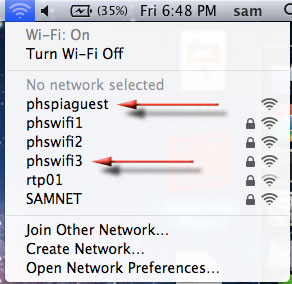
Partners I.S. supports two wireless networks that you can connect to.
The first, phspiaguest, is available to all guests. Once connected, you will need to open a browser and accept a certificate before you can connect to the web. phspiaguest is outside the Partners firewall, so no intranet websites or file shares can be loaded, nor can you print to network printers from it. Although non-encrypted devices are permitted to connect to this network, you cannot use it to conduct any hospital business, or conduct any transactions that require your NMR or Partners password unless you're on an encrypted device.
The second network, called phswifi3, can be used via the LEAP protocol, and requires your Partners username and password to connect. phswifi3 is inside the Partners firewall. Any mobile devices that connect to this WAP must be encrypted.
Wireless Access Points (WAP) are installed randomly throughout CNY149 and CNY75. Signal strength is relative to your proximity. Partners I.S. manages the WAPs and the wifi networks. Problems with either should be reported to the Partners Help Desk and not the Martinos Center Help Desk.
You are not allowed to install your own personal wireless access points. If Partners detects these on the network they will disable any ethernet ports being used by your wireless router.
Is there a flatbed scanner I can use to scan my photos/documents?
Yes. There is one in South Central connected to the Partners PC workstation on the first floor of CNY149. You will need your Partners username and ID in order to use it.
There is also a copier/scanner on the second floor of CNY75 near the elevator that you can use to scan a document to an email address. In order to email a scan, do the following:
- Press the Scanner button to the left of the copier display.
- Under the E-mail tab, choose 'Manual Entry' and enter the email address of the desired recipient (this can be yourself).
- Press 'Okay'.
- To the left of the E-mail tab, choose 'File Type / Name' and select either 'Single Page' and the desired file type (TIFF, PDF) or 'Multi-Page' and the desired file type (TIFF/PDF).
- Press 'Okay'.
- Place your document face up in the auto-feed tray.
- Press the green 'Start' button to the right of the copier display to scan your document(s).
- Once you the scan is complete, you must press the pound (#) symbol to send the document.
My computer won't turn on, what should I do?
Sometimes a complete power cycling of the computer will get it to power on again.
- Some computers have a second power switch in the back, where the power cord connects. Turn this to the 'off' position.
- Unplug your computer and wait 15-30 seconds.
- Plug the computer back in.
- Turn the power switch in the back of the computer back to the 'on' position.
- Press the power button on the front of the computer.
Applications
I need program X installed on my workstation?
Our support resources are limited and installing non-standard software on user workstations will be considered on a case-by-case basis. Email help@nmr.mgh.harvard.edu
We have lots of non-standard or custom install open source software installed under /usr/pubsw/packages and elsewhere. For a more details on some of the major packages please see our Software Installed page (login required).
What programs do we have a site license for?
Currently, the only application program for which the Martinos Center has a site license is Matlab. Any application other than Matlab must be purchased by those wishing to use them.
The Martinos Center has a limited number of network licenses that let users run Matlab for free when running on workstations inside the Martinos Center network. If you need Matlab to run on your home PC, laptop or other machine outside the center, you will need to buy a standalone license as discussed below.
How do I install Antivirus?
The MGH has a site license for TrendMicro Antivirus software. See the instructions below for installing TrendMicro on your Mac/PC.
TrendMicro A/V Security for Mac
TrendMicro A/V Security for Windows.
How do I run Matlab on my NMR linux computer?
You can see what versions of MATLAB are currently available for running on Martinos Linux systems by running
ls /usr/pubsw/bin/matlab*
How do I run Matlab on my own Windows or Mac computer?
Standalone License
If you need a copy of Matlab that will work wherever you go you need to buy a standalone license. Contact Mary Ellen Bowman (mbowman@mathworks.com) for a quote and then submit the quote to whomever handles purchasing for your department.
Network License
This version only works when you are connected to the network inside the Partners firewall.
Install instructions here (Intranet login required).
How can I install Microsoft Office?
Partners HealthCare has an Enterprise Agreement with Microsoft.
The agreement allows each user to install Microsoft Office 365 on up to 5 computers used for business-related purposes.
You can download Microsoft Office here: http://portal.office.com . Once downloaded, you will need to contact the Partners Help Desk at 617-726-5085 and request that they assign an Office 365 license to your Partners account.
All Office 365 issues should be reported to the Partners Help Desk.
How do I buy SPSS or SAS or S-PLUS?
Recently Harvard was notifed by SPSS that they cannot resell SPSS licences at the educational discount to their hospital affiliates. This is the same thing Microsoft told them many years ago. This new policy seems to apply to all education software resellers. So for SPSS, if you need to buy it on a Partners PO, you will be paying full price.
SAS and S-PLUS can be bought at academic discounts still from Harvard so contact technologyservices@harvard.edu for more information.
Another option is to convert to using 'R', the open source statical software package. R has quickly grown in support and use and from what I understand is really becoming the new industry standard. Check out R's main web site.
Though R is mostly based on the language of the 'S'/'S-Plus' package, there are resources for SPSS and SAS users who want to use it such as this site.
We have R installed at the Martinos Center right now. Just run 'R'.
How do I buy Adobe Products?
We are no longer able to buy Adobe products at academic discount through Harvard using Partners funds. If you absolutely have to buy an Adobe product via a Partners PO, you will have to pay retail prices at some place like PCConnection at this time. If you have a Harvard ID and want to use your own funds or a Harvard grant, you can still buy the products via Harvard TPC at discount.
How do I buy Endnote?
Please ask whomever handles purchasing for your department to contact Partners Insight.
How do I buy other software?
Check out the prices from Insight on Partners Software Asset Management Home Page.
How do I run Freesurfer or other analysis programs?
The IT Support Group does not support specific analysis programs. For support with Freesurfer, visit the Freesurfer Website.
For other commonly used software at the Martinos Center log into our intranet and visit https://www.nmr.mgh.harvard.edu/intranet/computer/software.
What program do I use to view/edit images? To screen capture? I cannot find the xv program?
Use the commands from the ImageMagick suite of tools. Run 'man ImageMagick' for a list of commands. The display command can be used to view and edit images. The import command can be used to screen capture.
The xv program is a commercial program that requires anyone who uses it to buy a license. We will not install it on systems unless the user proves they have bought a license.
How do I get my Linux box to show Chinese/Japanese/etc.?
You should contact help@nmr.mgh.harvard.edu and ask them to install support for your desired language on your workstation (make sure to give the name of the workstation).
My GNOME Desktop is acting strangely. How do I reset it?
If a linux computer crashes while you are logged in or if you go over your home directory quota, your GNOME settings may become corrupted. These instructions will help you reset GNOME to orginal defaults. This will only work if you are logged out of all GUI logins on all NMR linux computers (including VNC, and NoMachine sessions). Sitting at a linux machine's console, first log out (use Ctrl-Alt-Bksp to force quit your desktop if you have no panel) and then press Ctrl-Alt-F1 together. Login at the text prompt and then do
pkill -u $USER gconfd-2 pkill -u $USER nautilus rm -rf .gnome .gnome2 .gconfd .gconf/desktop .gtk* .sawfish* .save-* .gnome*private .gvfs rm -rf /tmp/gconfd-$USER /tmp/orbit-$USER
Also look in the directories:
~/.config ~/.local/share
for files/directories with gnome or gtk in their names and remove them.
Then 'exit' to logoff and press Ctrl-Alt-F7 together. You can then login as normal. If not at the console, just ssh to any Linux box and run the above commands.
Remember to go into Screensaver Preferences after this and set your screensaver back to Blank
How can I change my default login from Gnome to KDE?
This is now an option from the graphical login screen.
Firefox keeps complaining it is already running. Should I create a new profile?
Please read the explanation on this page. Assuming you are not running Firefox already and have a stale lock, you can will simply need to delete the lock files from your default profile folder. You can find these files using these commands (NOTE: in what follows -name is the literal text -name. Not your username.):
find ~/.mozilla/firefox -name lock
find ~/.mozilla/firefox -name .parentlock
BEFORE YOU DELETE THE "lock" FILE, do an "ls -l" on it to see where it points. It will point to something like "132.183.203.167:+7287" which means it thinks firefox is running on the machine with IP address 132.183.203.167 with process ID 7287. Do an 'ssh' to that IP address and login and run 'ps auxw | grep firefox' to see if firefox really is running there.
If firefox still refuses to run and you are sure you have no other instance of it running, then follow the steps in the next item to reset your firefox settings.
Firefox is acting abnormally and/or not displaying correctly.
Try resetting your firefox settings by following the below steps:
cd ~/.mozilla/firefox ls
Figure out what your profile directory is (some random string) and cd into it. Do an 'ls' and you should see an extensions directory. Then run:
rm -rf extensions/*
Then try to start firefox. If firefox still does not start, make a copy of the bookmarkbackups directory from your profile somewhere safe. Then remove your whole profile directory. Run firefox. Assuming it works, exit it. Then restore the bookmarkbackups directory from your backup. Then run firefox again and do a restore of your bookmarks.
Someone in my lab has locked the screen on their linux desktop. Can I unlock it?
The key combination ctrl-alt-backspace will reboot the X server and force logout anyone who is logged in at the console. This will also kill any processes that user was running. Note ctrl-alt-backspace is not the same as ctrl-alt-del (which will reboot the entire computer).
How do I build/run Docker containers on my linux desktop?
Information on how to use Docker and Singularity at the center can be found on this page.
Files and Disk Space
Why is my login to CentOS hanging? How can I reset my .cshrc?
If you put a symlink to another computer in your home directory, or if you source directories on other computers automatically in your .cshrc or .login files, then you have made your CentOS logins dependent on those computers being online. If they are not online, your logins will hang. Either delete the dependencies, or get those computers back online. We recommend you put all symlinks one directory level down from your home directory (ie ~/links/) to avoid this problem.
A quick fix, is to reset your .cshrc and .login files.
cd ~
mv .tcshrc .tcshrc.SAVE (.tcshrc might not exist, that's ok)
mv .cshrc .cshrc.SAVE
mv .login .login.SAVE
cp /cluster/itgroup/users/skel/.cshrc .
cp /cluster/itgroup/users/skel/.login .
If you cannot login at all, contact the Help Desk and ask us to reset these files for you.
How do I use the graphical file browser in Linux to view my partitions in /space ?
Don't use it. The Martinos Center uses an automounter to handle over a thousand network accessible volumes. This overwhelms the nautilus GUI file browser and most others too. It is buggy, and will often cause your linux computer to freeze. You will avoid a great amount of headache if you learn to use the unix command line terminal to navigate through your lab's file space.
Why does my home directory have such a small quota?
Home directories are not the place to store analysis data. These are personal files spaces for simple documents, email and settings. Research data should be stored on group volumes or central RAID volumes ( /space or /cluster). The home directory quota is 2GB. Ask your group's PI about where your group volumes are that you can store your analysis data on.
To figure out how much of your home directory quota you're using, open a terminal and run:
quota -s
I am over quota. How do I fix it?
The most common reason users go over quota are failure to empty the Trash on their desktop, and Firefox/Chrome browser cache filling up. You can limit the Firefox cache size in its settings.
You will need to get to a text login. If you are at a Linux workstation, log out if you are logged in. Press Ctrl-Alt-F1 to get a text login and then login. Run 'quota' to see how far you are over quota. Delete or move files to get comfortably under quota. Then logout and press Ctrl-Alt-F7 to go back to the GUI login.
You can run
du -sk -- .??* * | sort -n
as a way to get a list of what is taking up the most room. The .??* catches hidden directories like .Trash which is often filled as people forget to empty it.
Other common problems are Singularity or Python filing up their directories in ~/.local for which the best solution is to symlink those directories to somewhere in your group's cluster or space volumes. The same issue can happen with ~/.nv with certain NVIDIA/CUDA based problems that cache stuff in your home directory.
After going over quota is it common that your Gnome desktop settings might be corrupted. If so, please follow our instructions for resetting gnome on this FAQ.
Where can I store my data?
Each group is responsible for buying the disk storage space they need to do their analysis. The Martinos Center has a large storage cluster attached to the batch compute cluster from which space is sold at $320/TB/year. This includes a weekly mirror backup. This space is ideal for those using the compute cluster but is also great for use from Linux workstations and can even be accessed from OSX and Windows machines. For more information, please see our Disk Space page.
If you are a new user, ask your supervisor or a more experienced user in your group about what disk spaces your group may already own.
Is there any large temporary space I can use?
Yes, a few spaces. Please see our Disk Space web page for a list.
Is my data backed up?
That depends on where it is, and what kind of backups you, or your lab, arranged for that location. Our recommendations, which a lot of Martinos Center labs follow, are described on our Backup web page.
Is my home directory backed up?
Yes. See our Backup web page.
How do I get files restored from a volume that is backed up?
Send us an help@nmr.mgh.harvard.edu detailing the full path of the files and directories you need restored. Tapes for our old central RAIDs are stored in building 120 and due to increments, many tapes may have to spooled through. So the whole process can take a couple of days.
Who can read, write, delete my files?
Please read the Basic File Permisssions section on our Security page.
How do I setup permissions so a group of users have write access?
This is a complex issue with no simple answer. There is a discussion of what you need to know on our Understanding Group Permissions in UNIX page.
How do I find out what permission groups I am in?
Log in to your Linux account and in a terminal window run the command
groups
A list of groups your account is in will be printed. The first group listed will be your personal group. You can give an account name as an argument to find out what groups another user is in.
To find out what users are in a particular group named groupname, you need to run
ypmatch groupname group
In a nutshell, use the setgrp script to make sure permissions on a folder are set for all of your group members to allow read/write access
Eg: /usr/pubsw/bin/setgrp -c iliad /space/computer/1/users/mydata
or /usr/pubsw/bin/setgrp -c iliad /cluster/mylab/mydata
Note that setgrp can only be run on files you own, not on files owned by others.
How secure is my data?
When someone asks "how safe is my data?", there are at least two different aspects to what "safe" means: data loss/corruption and data access security. The first issue is discussed on our Backup web page. The security issue is discussed on our Security web page.
How do I mount a USB drive on my computer?
For Linux CentOS systems, plug USB cable from the drive to the USB port on the computer. After a few seconds the drive should mount automatically under the /media/<LABEL> directory if it has been given a label or under /media/usbdrive if it hasn't.
For non-UNIX filesystems, the owner of the files at the mount point will be the current user logged in at the computer console. If no one is logged in at the computer console (i.e. only ssh'ed in remotely), the USB drive will not auto-mount.
Make sure to use the USB 2.0 ports. These are usually only on the back of the machine on a PCI card (unless you have a post-2008 machine). You can tell if your disk is in a 2.0 plug (usually) by running the command 'lsusb' in a terminal window after the drive mounts. You should see the drive on Bus 001. If not, it is on a USB 1.1 plug.
Why use USB 2.0 rather than USB 1.1? USB isn't particually fast as a rule but USB 1.1 is glacially slow by comparison to USB 2.0.
For Mac OSX Tiger or Windows XP systems, plug the USB cable from the drive to the USB port on the computer. After a few seconds you should see the drive mounted on your Desktop (for Mac OSX Tiger systems) or in "My Computer" (for Windows).
These instructions work for thumb drives as well.
IMPORTANT NOTE! ALWAYS unmount your disks BEFORE you unplug them. Failure to do so can result in unrecoverable data corruption.
How do I best copy/move large amounts of data?
For transfering large numbers of files within the Martinos Center, you should use the rsync command. See our rsync Tutorial. For remote transfers, see the REMOTE ACCESS section below.
Remote Access
How do I get a text login to the Linux systems from outside MGH?
Please read the SSH Login section of our Remote Access page.
How do I get a GUI login to Linux/Windows/Mac systems from outside MGH?
https://www.nmr.mgh.harvard.edu/intranet/computer/remote-access
How do I use NoMachine to connect to my linux computer?
Step by step instructions, including screen shots can be found at https://www.nmr.mgh.harvard.edu/intranet/computer/remote-access/nomachine -- intranet login required to view instructions.
If you want to remotely access the display your Martinos Center Windows workstation from outside MGH, follow the instructions for VNC found here.
How do I transfer my data to/from outside MGH?
Please read the Transfering Data section of our Remote Access page.
How do I make data available via FTP to outside users?
Please read the Sharing Data section of our Remote Access page.
How can outside users send me data files?
Please read the Sharing Data section of our Remote Access page.
How do I access internal MGH web sites from outside MGH?
Please read the Web Proxy section of our Remote Access page.
Do you support VPN?
No, the Martinos Center itself does not have an VPN setup. But MGH/Partners does which would put you inside the MGH firewall to handle all the above items. Using their VPN require you to have a Partners account and to register with the Remote Access service. There VPN also cuts off your computer from all other networks while you are VPN'ed into MGH so that can create problems. For more info go to the internal-only Partners Helpdesk.
Printing
How do I print to printer X at the center?
Please read the Printing web page.
Who do I contact if the printer needs paper?
It is not the responsibility of the Sysadmins to stock the printers with paper. Do not email the IT Help Desk asking us for paper. Network printers are a shared resource at the Martinos Center, so if you use the printers, it is your responsibility to get paper for them. Paper is stocked in the Administrative area (Rm 2301) next to Janice White's desk. Do not contact Janice and tell her you need paper, you must go to the office and get it.
Who do I contact if the printer needs toner?
All printer users are responsible for restocking and installing ink cartridges. This is not the responsibility of the help desk. Most groups have designated personnel who contact Janice when new toner needs to be ordered.
If you replace a toner cartridge, please use the packaging from the new cartridge to recycle the old one. The box with the new cartridge will contain a UPS shipping label you can affix to the box to send the old cartridge back to the manufacturer. You need to label the box with the old cartridge and take it to the UPS receiving area next to the first floor mail room in building 149.
Who do I contact if the printer looks fine but jobs don't print?
You should contact help@nmr.mgh.harvard.edu but first try power cycling the printer (turn it off, wait 10 seconds and turn it back on) and resending your document to print. Also make sure the computer from which you are trying to print is connected to the network (do webpages load ok?). As always, when you email us, be sure to include the name and physical location of the computer you're using.
Who do I contact if the printer is just plain broken physically?
Call the Partners Help Desk at 6-5085 to report the problem. They will send a technician to the printer and is it best to have someone in the area of the printer (i.e. YOU) be the contact. See if the printer has a Partners/MGH Control number on it and have that ready when you call. If you see no control number, make sure to know the model number and room number of the printer.
How do I get a conference poster printed?
The Martinos Center no longer has a poster printer.
The MGH Photography Department has a 44" printer and charge $10/square foot with same-day turnaround. Phone 617 726 2237, email mghphoto@partners.org.
We've also had PhD Posters recommended to us. http://www.phdposters.com/
How do I get something printed on both sides of the page?
The only network printer at the Martinos Center that supports duplex printing is decacolor, listed here.
I keep getting errors trying to print in MATLAB
Unfortunately Java is just plain broke and the print GUI in matlab will often just fail. You will have to use the print command from the command line as documented at the following address.
http://www.mathworks.com/access/helpdesk/help/techdoc/ref/print.html
And in general you will do something like
print -dpsc2 -Psccolor
Web and Other Services
How do I get a website for my research group?
Please contact webmaster@nmr.mgh.harvard.edu for more info.
How do I get a website just for my personal stuff?
Send email to the Martinos Center Help Desk and request that we create a /space/public_html/user directory for you to write to. Any files you put there will be visible from http://www.nmr.mgh.harvard.edu/~username. If you create a file called index.html in the directory it will automatically load anytime someone opens a browser to that link. If you choose not to have an index file, the browser will list all the contents of the directory.
How do I create, change or hide my people page data on the Martinos Personnel Pages website?
Please see the People Page Editing web page.
How do I add a photo to my people page data on the main website?
Create a jpg that is 150 x 150 pixels and email it to webmaster@nmr.mgh.harvard.edu
Can you setup a Wiki for my group?
Partners is mandating the use or LabArchives as an electonic lab notebook. It contains a wiki component. Please contact Partners for support. https://rc.partners.org/eln/faqs
Can you setup a content portal like Plone for my group?
Send email to webmaster@nmr.mgh.harvard.edu to ask for options.
How can I access journal article PDFs?
The Martinos Center has no special access itself. If you have a Harvard appointment, you can access articles through their eCommons site.
The Partners web content filter is blocking access to a site I need to use, what should I do?
It's the Partners Help Desk that is doing the blocking. Open a ticket with them to have it unblocked. http://helpdesk.partners.org/computerhd/issues/xnewissue.asp (requires partners username/pw)
Can I recruit study subjects on any NMR mailing lists?
You may use the community@nmr list to recruit study subjects only if you have explicit IRB approval to use this list. You must start your recruitment email with text stating that you have IRB approval. Simply using IRB approved wording from a study ad is not sufficient. You must have approval to use the mailing list itself. Here is an example of an IRB amendment proposal used for this purpose.
Is there a GitLab or GitHub available to the center?
We have information available on this here
-->